
How to Cap a Claude Code Loop's Spend
Set a Claude Code budget limit per run so an unattended loop can't burn $200 overnight: a hard --max-budget-usd cap, a model router, and context trimming.

Summary:
--max-budget-usdis a real per-run dollar kill-switch for headless loops; the wall is physical.Route grunt work to a small cheap model and reserve the capable model for judgment.
Trim context so a long loop doesn’t pay a compounding tax on its own history.
Copy-paste budget gate plus a cheap watchdog that pauses any loop running hot.
There is no Claude Code budget limit hiding in the settings that stops a loop at $200, so you build the controls yourself. One developer worked out his “simple” automation would burn 700 million tokens a month once he did the arithmetic on his scheduled agents. He hadn’t run it yet. He just multiplied it out and posted it half in disbelief. A loop that re-reads, retries, and explores on every run, several times a day, adds up to numbers that don’t feel real until the bill makes them real. Here’s how to cap it.
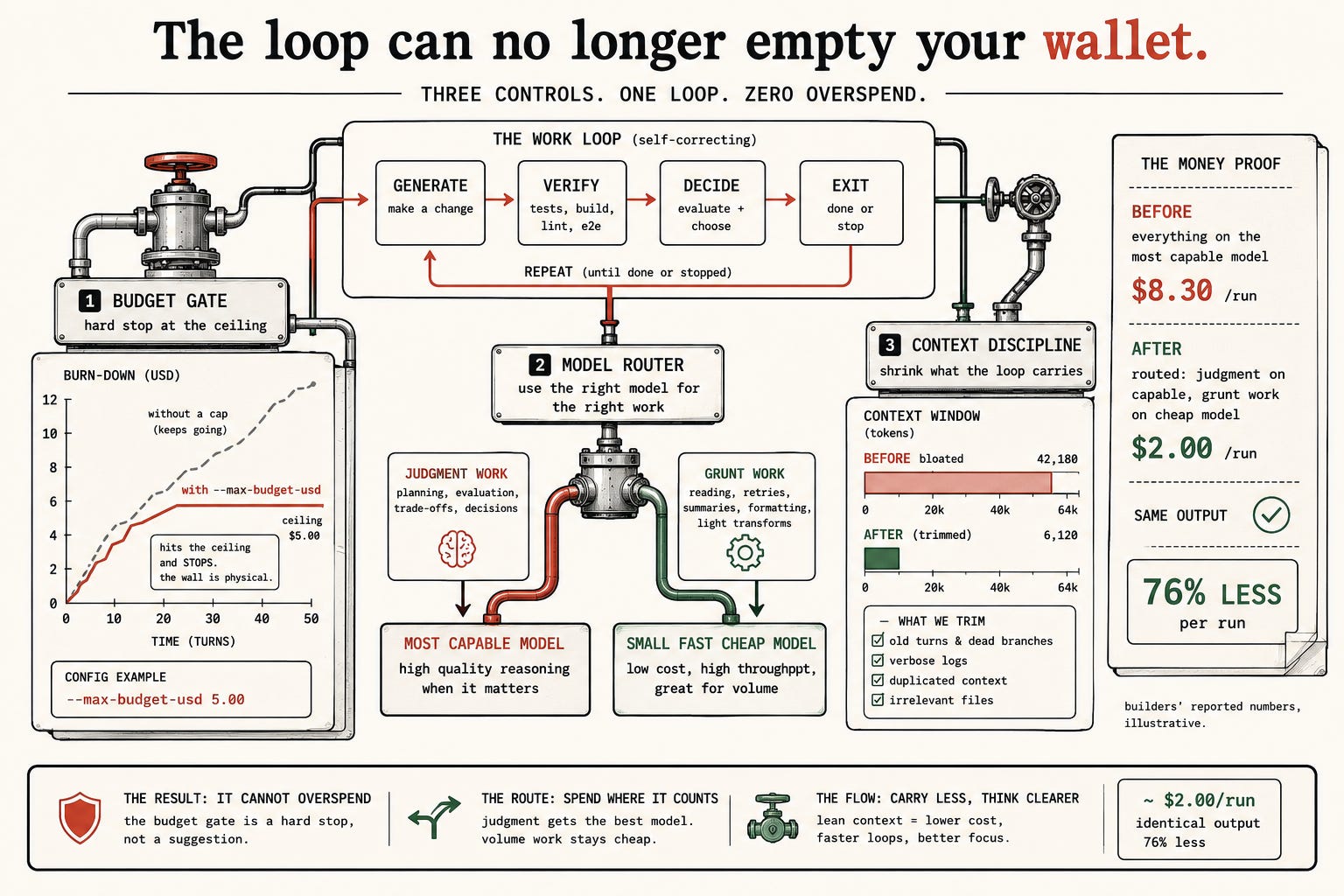
What’s the hard limit on a Claude Code loop’s spend?
For a loop you run non-interactively, from your shell or a script, there is a real, built-in dollar ceiling: --max-budget-usd. You hand the run a maximum dollar amount and it stops when it hits that number.
# The built-in per-run dollar ceiling (works with -p / headless). The loop cannot exceed this.
$ claude -p --max-budget-usd 5.00 --output-format json \
    "/goal all tests pass and lint is clean, or stop after 8 turns"
That --max-budget-usd is a genuine kill-switch: the run halts when it has spent that much, full stop, regardless of what the loop thinks it still wants to do. The $200 overnight does not happen to a loop launched with a five-dollar cap. The wall is physical.
Now the part people overclaim: that built-in cap is for non-interactive runs. If you’re sitting in an interactive session driving a loop by hand, there is no magic per-run dollar flag watching your spend. There you set a monthly ceiling on your account with /usage-credits, which prompts you near the limit rather than killing a run mid-task, or you wrap the work as a headless run with the cap above. What you must not do is assume the interactive session is quietly protecting you. It isn’t.
What broke: the $200 overnight
The loop spent $200 because nothing was watching the meter, and a loop’s cost is not its visible output. You see one merged pull request and think “that was cheap.” You don’t see the eight exploratory turns, the three dead ends it backed out of, the test suite it ran six times, the codebase it re-read on every lap. Autonomy has a price, and the price is all the work that didn’t ship. A builder in that thread cut straight to the lesson:
“the real lesson is agents need hard budget caps, not just review cycles. $200 is tuition. set a max spend threshold that kills the loop automatically.”
(From the r/ClaudeCode thread where an overnight loop ran 91 review rounds and burned $200.)
That waste isn’t a bug, it’s what exploration is. The job isn’t to eliminate it, it’s to cap it with --max-budget-usd and a turn clause so the waste is bounded and known instead of open-ended and discovered after the fact. Three controls do it, and they all wrap the same self-correcting work loop, generate then verify then decide then exit or repeat, without touching what it produces. In order of payoff:
Control 1: the budget gate
The dollar cap is the control that makes every other one optional rather than urgent, so set it first. Run the loop headless and pull back what it actually spent, so you can log it and alert on it:
#!/usr/bin/env bash
# budget-gate.sh: run a loop with a hard ceiling and report what it spent.
CEILING=5.00
result=$(claude -p "$1" --output-format json --max-budget-usd "$CEILING")
spent=$(printf '%s' "$result" | jq -r '.total_cost_usd')
printf 'Loop finished. Spent $%s of a $%s ceiling.\n' "$spent" "$CEILING"
When the loop is still churning at the wall, the cap ends it and says so, instead of charging on:
Budget limit reached: spent $5.00 of $5.00 cap. Stopping.That line is the whole point. A loop that would have ground out a hundred more dollars of exploration stops dead at the number you set, and you find out from a clean message, not a bill.
Control 2: route grunt work to a cheap model
The biggest lever after the cap is which model does which work, and it’s yours to configure. There is no automatic router that watches prices for you. Most of what a loop does is grunt work: reading files, running commands, summarizing output, applying mechanical edits. None of that needs your most capable, most expensive model. It needs a small, fast, cheap one. Reserve the expensive model for the parts that take judgment: the planning, the tricky fix, the design call.
# Plan with the capable model, then execute with a cheaper one, automatically:
/model opusplan

# Pin a cheap model for all subagents at once, via environment:
CLAUDE_CODE_SUBAGENT_MODEL=haiku
Set the volume work to a cheap tier and a long loop’s cost drops by a large fraction with no change to what it accomplishes. The before-and-after on a single overnight triage loop makes it concrete (these are builders’ reported, illustrative numbers, not a guarantee):
BEFORE: everything on the most capable model
  planning ........... $0.90
  reading + grunt .... $7.40   (the volume, billed at premium rates)
  total .............. $8.30 / run

AFTER: opusplan + cheap-model subagents
  planning (capable) . $0.90
  reading + grunt .... $1.10   (same work, cheap tier)
  total .............. $2.00 / run    (~76% cut, identical output)
The work is byte-for-byte the same. Only the tier doing the high-volume reading changed. Keep the framing in prose about tiers, cheap-and-fast versus capable-and-expensive, because the specific model names change, but the discipline of routing grunt work cheap never does.
Control 3: keep context from ballooning
A long loop pays a compounding tax the budget cap stops but doesn’t explain: context bloat. Every turn, the conversation gets longer, and a longer conversation costs more to process on every subsequent turn. Trim it, and a bloated context drops hard:
CONTEXT WINDOW (tokens)
  BEFORE (bloated):  42,180
  AFTER  (trimmed):   6,120
  what we trim: old turns & dead branches, verbose logs, duplicated context, irrelevant files
The strongest lever is filtering output before the agent ever reads it. A hook that trims a thousand-line green test run down to just the failures saves tokens on the turn it happens and every turn after, because the noise never enters the context to be reprocessed:
#!/usr/bin/env bash
# trim-output.sh: keep only failures/errors so a passing run costs almost no tokens.
input=$(cat)
echo "$output" | grep -E 'FAIL|ERROR' || echo "all checks passed"
The cheapest token is the one the agent never had to read, and in a long loop that principle compounds in your favor instead of against you.
The build: the budget gate and a cost watchdog
Put the headless dollar cap on every unattended run. Launch with
--max-budget-usdset to a real ceiling. For most loops this is enough on its own.Capture what each run cost. Read
total_cost_usdout of the JSON so you can log it, alert on it, and feed it to a watchdog.Build the watchdog: a loop that guards your loops. A small script periodically checks each running loop’s spend and pauses any running hot, then pings you. It needs almost no intelligence, it compares two numbers, so route it to the cheapest model and it costs almost nothing to run constantly:
---
name: cost-watchdog
description: Compare a loop's actual spend to its expected spend; flag if over 3x. Numbers only.
model: haiku
---
Compare the two figures you are given. If actual exceeds three times expected, output PAUSE.
Otherwise output OK. Do not explain. Do not read code. Compare the numbers.
Prove the gate kills an expensive task. Point a loop at something deliberately costly and run it under a low cap. Confirm it dies at the ceiling instead of running to completion. A budget gate you haven’t watched kill something is a budget gate you don’t yet trust:
# Deliberately expensive goal + a tiny cap -> confirm the cap wins.
claude -p --max-budget-usd 0.50 --output-format json \
  "/goal refactor every file under src/ for style and add tests, or stop after 50 turns"
# -> Budget limit reached: spent $0.50 of $0.50 cap. Stopping.
That message is the receipt. You’ve now personally watched the brake stop a runaway, which is the only thing that makes you trust it at three in the morning.
What should you actually do?
If you’re leaving a loop unattended → run it headless with
--max-budget-usd. Nothing else matters if the loop can run unbounded, so set this before you touch anything else.If a loop feels expensive → don’t guess where the money goes. Run the usage breakdown after a representative run, find the line bigger than you expected (often a chatty subagent re-reading the same file), and point your controls at that. Measure, cut, measure again.
If you’re learning on a tight budget → route everything to the cheapest model, turn effort down, and cap every run at a dollar. The discipline you build at four cents is the same one that holds at four hundred dollars.
If you track one number → track cost per accepted change, not tokens spent. A loop whose runs cost a dollar each is expensive if you keep one change in five.
The bottom line
The model writing the code was never the expensive part. Once a capable model writes code for almost nothing, the costly thing is the loop running it. Cost control isn’t hygiene, it’s the main event.
The dollar cap is the one that saves you; the model router is the one that saves the most. Set the cap first, route grunt work to a cheap tier second, and the rest is refinement.
The price of entry to all of this is a few cents and a tiny cap, not the $200 night. Anyone telling you autonomous loops are too expensive to learn is imagining the bill, not the controls.
Set the dollar cap first and route the grunt work to a cheap tier second, and an unattended loop physically cannot empty your wallet.
— COOK
FAQ
Is there a hard spending limit per run in Claude Code?
Yes, for non-interactive runs: --max-budget-usd sets a real dollar ceiling and the run stops when it hits that number. It works with -p (headless). An interactive session has no per-run dollar flag; you set a monthly ceiling with /usage-credits instead.
How do I stop a Claude Code loop from running up a $200 bill overnight?
Run it headless with --max-budget-usd set to a number you’d shrug at. The run halts at that dollar amount regardless of what the loop still wants to do. Add a cheap-model router and context trimming to cut the cost of every run underneath the cap.
Does routing grunt work to a cheaper model actually save much?
Yes. Most of what a loop does is reading, retries, and summaries, which don’t need your most capable model. Builders report cutting a run from around $8 to around $2, roughly 76% less, with identical output, just by routing volume work to a cheap tier.